What held me back very long from using Ubuntu Server on my crunchers, which has no GUI but is command line only? It was not the command line itself, but the fact that controlling BOINC with boinccmd is very inconvenient. There is simply no way of getting an easily readable format that shows, which workunits you have and which are running. This is much easier with the BOINC Manager, which needs a GUI.
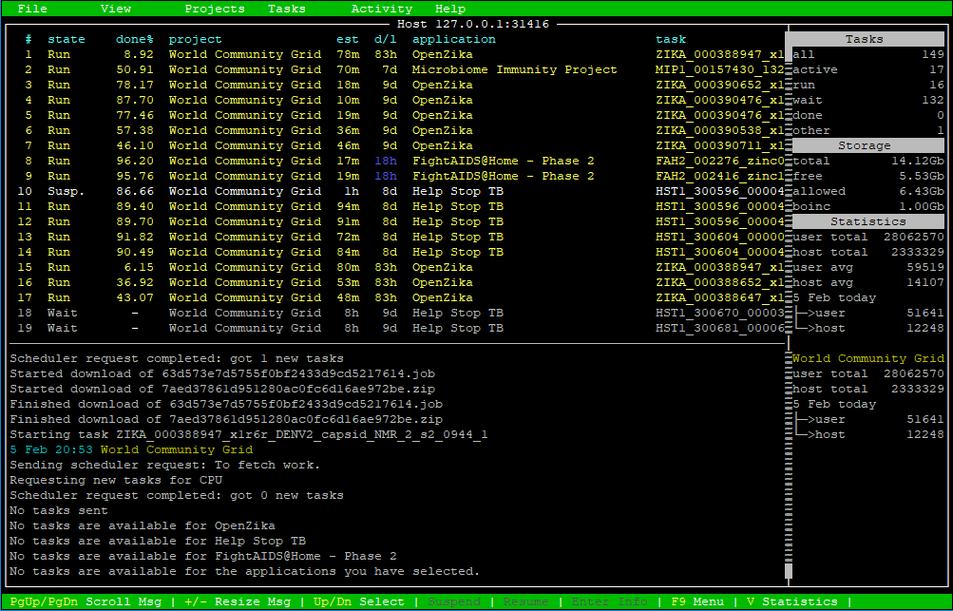
Luckily I realized, that there is a tool called Boinctui. This is a command line manager for BOINC, that is almost as convenient as the BOINC Manager! See for yourself:
How to install Boinctui
To install Boinctui, you type the following commands:
sudo apt-get install boinctui
sudo apt-get install screen- the first line installs Boinctui itself
- the second line is optional. It installs a window manager called screen, which causes Boinctui to look better
Now you can start Bointui by typing:
screen boinctuiAlternatively you can also start it without using screen, but it will look less good (just try to see the difference):
boinctuiUsage of Boinctui
Usage is really straight forward. Just look at the green bar at the bottom which key has which function.
You can scroll through the workunits and can suspend them with S, resume with R or abort with A. By pressing Enter you see details of the selected workunit.
With Page up and Page down you scroll through the Messages.
By pressing F9 you open the menu and do several more things, like customizing the shown columns in the workunit list or add projects to BOINC.
With Q you quit Boinctui.
Comments
There are currently no comments on this article.
Comment